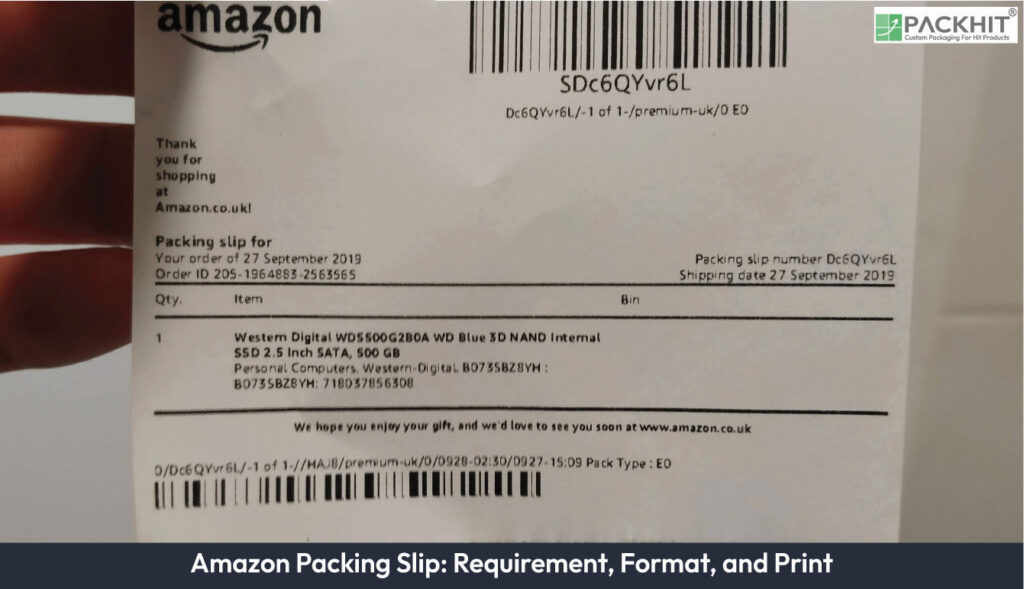
An Amazon packing slip is a vital document included in shipments to provide detailed information about the order, such as product descriptions, quantities, and recipient details, ensuring accurate fulfillment and smooth returns. It excludes pricing details and adheres to Amazon’s specific formatting and compliance requirements, including legibility and clarity. The slip’s structure typically includes a header with seller information, an itemized list of products, recipient details, and a footer with return instructions or customer service contacts. Printing a packing slip involves accessing Amazon Seller Central, selecting the order, generating a PDF, and printing it on plain white paper. Manufacturers may face challenges such as formatting inconsistencies, data inaccuracies, and compliance issues, but can optimize the process through standardized templates, automation, and batch printing.
- What is an Amazon Packing Slip?
- Requirements for an Amazon Packing Slip
- Inclusion of Essential Information
- Seller Identification
- Exclusion of Pricing Information
- Legibility and Clarity
- Compliance with Amazon Standards
- How Should an Amazon Packing Slip Be Formatted?
- Process for Printing an Amazon Packing Slip
- Common Challenges in Creating Amazon Packing Slips
- How Can Manufacturers Optimize Packing Slip Processes?
What is an Amazon Packing Slip?
An Amazon packing slip is a shipment document placed inside a package. It identifies the order, recipient, delivery address, and shipped products. Typical fields include the order number, product names or SKUs, and quantities.
For a manufacturer preparing custom paper-based packaging, the slip gives the packing team a written check against the order record. Match the order number, product description, variant, and quantity with the goods assigned to the carton before sealing it.
The document also helps separate similar shipments during a production run. A packer can compare the item rows with the carton contents, while a second operator can verify the address against the exterior label.
An Amazon packing slip does not replace the exterior shipping label, carrier paperwork, invoice, customs record, or product-specific compliance document. It generally lists shipment contents without item prices, so the recipient can identify the package contents without treating the sheet as a sales invoice.
Requirements for an Amazon Packing Slip
An Amazon packing slip requires accurate order data, recipient information, a readable item list, and a layout that keeps fulfillment details visible. The fields and print controls depend on the marketplace, fulfillment method, seller account, and current Amazon instructions.
At minimum, check four data groups before printing: order identification, recipient address, item details, and shipment quantities. Record the check in the packing procedure if the slip forms part of a controlled packaging process.
Amazon requirements and Seller Central options can change. Confirm the current instructions and available printing features in the applicable seller account before fulfillment, especially after an account, marketplace, or shipping-workflow change.
Inclusion of Essential Information
Include the order number, itemized products, quantities, and recipient shipping address. Add identifiers such as the SKU or ASIN if they appear in the applicable Amazon-generated document. These fields let the packing operator match the carton with the order record.
Separate each product variant into its own row when color, size, model, bundle composition, or pack count changes the item identity. Do not combine rows merely because the products share a brand or parent listing.
Seller Identification
Show the seller name and an applicable customer-service contact if the current document or account configuration includes those fields. Amazon-generated documents control which seller details appear, so compare the printed result with the current Seller Central settings before adding custom text.
Exclusion of Pricing Information
A packing slip generally excludes prices because it identifies shipment contents rather than charges. Treat this as a document characteristic, not a universal statement about every Amazon account or seller-created template. Check the current generated document and applicable instructions before fulfillment.
Legibility and Clarity
Use readable type, sufficient contrast, clear product rows, and an unclipped page. Remove decorative graphics that compete with the order number, address, or quantity fields. Review the PDF and a physical print if a custom workflow produces the document.
Check four print points: the order number remains readable, the address fits within the page, every item row appears, and no second page contains detached shipment data. Set the printer to the document’s original scale instead of using a fit-to-page setting that changes the layout.
Compliance with Amazon Standards
Compare the packing slip with the current Amazon instructions for the relevant fulfillment route. A field requirement or print option can differ by account and shipping method. Record the review date in internal shipping procedures if the slip forms part of a controlled packaging process.
How Should an Amazon Packing Slip Be Formatted?
An Amazon packing slip uses a simple layout that places order identification, recipient data, and packed-item details before optional text. The exact fields depend on the document generated for the seller account and shipment method.
Common formatting elements of an Amazon packing slip include the following sections:
1. Header Section
The header identifies the seller or shipment source. It can show the seller name, logo, phone number, or email if the applicable template permits those fields. Keep the order reference prominent instead of placing it inside a decorative header.
2. Order Details
The order-details section records the order number and can show the purchase date, fulfillment status, or shipping method when those fields appear in the current Amazon-generated record. Use the order number as the primary reference during carton matching.
3. Itemized List
The itemized list records each product, quantity, and available identifier, such as an SKU or ASIN. Separate variants by row if color, size, model, or pack count changes the product identity. The list gives the packer a direct count to verify.
4. Recipient Information
The recipient section displays the customer name and shipping address supplied for the order. Match that address against the shipping label and place the document in the corresponding package. Preserve apartment, suite, unit, and postal-code details exactly as generated.
5. Footer Section
The footer can contain return instructions, customer-service contact details, or other text permitted by the current template. Keep optional content below the shipment data and remove it if it causes a page break or reduces readability.
Use plain white paper and a printer setting that preserves the complete page. Check the order number, address, product rows, quantities, and page count after printing. Confirm current account instructions before adopting a custom template for repeated production shipments.
Process for Printing an Amazon Packing Slip
The current Seller Central workflow commonly begins in order management, but menu names, print controls, and document formats can differ by account and fulfillment method. Confirm the available commands in Seller Central before processing a shipment.
- Access the “Manage Orders” Section: Sign in to Amazon Seller Central and open the order-management area, commonly labeled “Manage Orders.” Search by order number, status, date, or another available filter.
- Select the Desired Order: Select the order that matches the package being prepared. Verify the order number, recipient address, products, and quantities before generating the document, especially when multiple orders contain the same SKU.
- Generate the Packing Slip: Choose the available packing slip or print command for the selected order. Seller Central can generate a PDF or another printable document, depending on the account and workflow. Use a newly generated file if the order details have changed.
- Print the Document: Open the generated file, check that no text or table row is clipped, and print it at its original scale on plain paper. Confirm the recipient information and itemized list before placing the sheet with the shipment.
- Include the Packing Slip in the Shipment: Place the verified packing slip inside the matching package before sealing it. Keep the sheet separate from exterior shipping labels and protect it from moisture or tearing during transit.
- Use Batch Printing for Bulk Orders: Use batch-printing controls only if they appear in the current Seller Central account and apply to the selected orders. Reconcile the printed pages against the order list before packing, because mixed pages can place the wrong packing slip in a shipment.
- Reconcile the Printed Pages: Count the printed slips and compare each one with the corresponding order record. For a multi-carton shipment, mark the internal carton record without covering the order number, address, or item rows. Remove duplicate or outdated copies from the packing station.
Seller Central menus, printing features, and Amazon packing-slip requirements can change. Confirm the current instructions at fulfillment time and retain the applicable internal review record.
Common Challenges in Creating Amazon Packing Slips
Common challenges include formatting inconsistencies, data inaccuracies, printing errors, manual effort, and compliance with Amazon’s requirements.
- Formatting Inconsistencies: Consistent formatting keeps order, product, and shipment details readable across packing slips. Variations in templates, field positions, fonts, or page breaks can hide important information and slow warehouse checks, customer service, or returns processing. Use one approved template and review its layout after changes to product or order data.
- Data Inaccuracies: Accurate customer details, product descriptions, quantities, order numbers, and shipment identifiers are required for correct packing-slip records. A wrong address, SKU, quantity, or order reference can send an item to the wrong destination or complicate a return. Pull these fields from the order record instead of retyping them during packing.
- Printing Errors: Readable printing depends on correct page size, printer alignment, legible text, and durable paper. Misaligned text can cut off an address or order number, while faded ink makes warehouse verification difficult. Test the first printed slip in each batch and replace low-ink cartridges or damaged paper before continuing.
- Manual Effort in High-Volume Operations: High-volume manufacturers spend additional labor generating, printing, sorting, and matching one packing slip to each shipment. Manual entry also increases duplicate slips, missing pages, and order mismatches. A connected order and inventory process can populate shipment fields, create the document, and associate it with the correct package record.
- Compliance with Amazon’s Requirements: Amazon packing slips must follow the marketplace’s current instructions for required information, document format, and shipment handling. Missing fields or an outdated template can delay fulfillment or create customer-service and returns issues. Review the applicable Amazon requirements before changing the template, and keep a dated copy of the approved format for internal checks.
How Can Manufacturers Optimize Packing Slip Processes?
Manufacturers can optimize Amazon packing slip processes by standardizing templates, automating data entry, and using batch printing. A standard template keeps required order and shipment details in the same position on each slip, while automated entry reduces manual copying errors.
Batch printing generates multiple packing slips in one run for larger order volumes. Manufacturers can pair this process with high-quality printing equipment so text remains legible and the paper stays intact during transit.
Periodic reviews can check template alignment with current Amazon requirements and confirm that printed slips remain durable and legible. These checks also identify outdated fields, data-entry errors, and print-quality problems before slips are packed with customer orders.