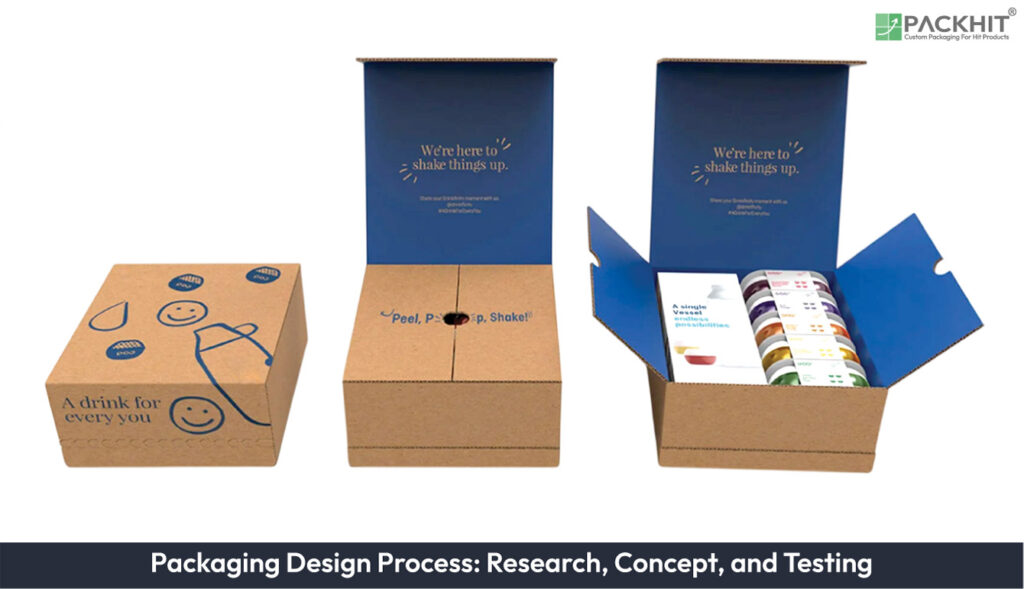
The packaging design process is the structured workflow used to transform a packaging design brief into a production-ready package. The process typically follows eight stages, including brief analysis, planning, research, concept development, artwork preparation, prepress, prototype testing, and production finalization. Throughout the workflow, manufacturers evaluate functionality, print quality, structural performance, and production feasibility to create packaging that meets both brand and manufacturing requirements.
The packaging design process involves eight key steps, which are mentioned below:
- 1. Understanding the Design Brief
- 2. Establishing a Project Plan
- 3. Research and Discovery
- 4. Concept Development
- 5. Artwork Implementation and Review
- 6. Prepress Production
- 7. Testing
- 8. Finalization
- Different Design Software Used in the Packaging Design Process
- Common Challenges in the Packaging Design Process
1. Understanding the Design Brief
The process begins with a thorough analysis of the packaging design brief. This document outlines the project’s objectives, target audience, budget, and any specific requirements. Designers evaluate the brief to identify any gaps or ambiguities and ensure all stakeholders are aligned on the project’s goals.
2. Establishing a Project Plan
A detailed project plan is created to ensure accountability in terms of timing, budget, and quality. This step involves setting clear milestones and deliverables to keep the process on track.
3. Research and Discovery
Research is conducted to gather insights into consumer preferences, market trends, and competitor strategies. This step is especially beneficial for brands with limited media and advertising support, as it helps identify opportunities to differentiate their packaging.
4. Concept Development
Designers create initial concepts using sketches, digital mockups, and structural prototypes that explore different visual and structural directions. Typical design deliverables include front-panel layouts, package structures, opening mechanisms, shelf mockups, and 3D visualizations. During this stage, manufacturers compare alternatives based on shelf visibility, consumer usability, manufacturing feasibility, material efficiency, and production cost before selecting the preferred concept.
5. Artwork Implementation and Review
Once a concept is finalized, the packaging artwork design is developed and reviewed. This includes creating detailed graphics, selecting colors, and ensuring the design aligns with the brand’s identity. Revisions are made as needed to refine the design.
6. Prepress Production
During prepress, artwork is prepared for commercial printing by creating dielines, assigning color specifications, and verifying print-ready files. Dielines define trim lines, folds, cuts, glue areas, bleeds, and safe zones required during package production. Color targets establish the intended CMYK or spot-color values so printed packaging maintains consistent brand appearance across production runs. Special finishes such as embossing, foil stamping, spot UV, or matte coatings are evaluated according to cost, substrate compatibility, production capability, and the desired tactile or visual effect before final approval.
7. Testing
Testing validates that prototype packaging performs as intended before production begins. Manufacturers typically evaluate structural durability through compression, drop, and handling tests, assess closure performance by repeated opening and resealing, verify print quality and color consistency against approved press proofs, and conduct usability reviews to identify consumer interaction issues such as opening difficulty or label readability.
Typical evaluation criteria include:
- Structural performance: Check for crushing, tearing, deformation, seal integrity, and product protection during handling and transportation.
- Print quality: Compare printed colors against approved proofs, verify registration accuracy, barcode readability, and text legibility.
- Usability: Assess opening and closing performance, grip, dispensing, resealability, and consumer handling.
- Production readiness: Confirm dieline accuracy, material compatibility, finishing quality, and print-file alignment before production.
Packaging design testing involves assessing durability, functionality, and consumer usability through rigorous trials and feedback loops. The objective is to confirm that the selected materials, structure, and graphics satisfy the project requirements established in the packaging design brief.
8. Finalization
Finalization incorporates approved testing results into the production-ready artwork and final supplier files. This includes verifying artwork files, dielines, color specifications, material selections, printing methods, finishing processes, and supplier-approved production files. Rather than guaranteeing compliance with unspecified industry standards, this stage prepares the design to meet the printing and packaging specifications defined for the project before mass production begins.
Different Design Software Used in the Packaging Design Process
Different design software programs are used for specific stages of packaging development, including graphic design, image editing, structural design, and prototype creation. The key details of commonly used packaging design software are given below.
- Adobe Illustrator: Used for creating vector-based packaging artwork, logos, typography, illustrations, and dielines required for print production.
- Adobe Photoshop: Used for image editing, product visuals, texture creation, and realistic packaging mockups.
- Esko Studio: Specialized software for 3D packaging visualization, virtual mockups, artwork placement, and package design reviews.
- CorelDRAW: A versatile graphic design tool used for vector illustrations, layouts, and packaging artwork development.
- ArtiosCAD: Designed for structural packaging design, including folding carton development, dielines, prototypes, and packaging engineering.
The use of these software programs depends on the specific requirements of the packaging project. Graphic design applications such as Adobe Illustrator and CorelDRAW are commonly used for artwork creation, while Adobe Photoshop supports image editing and visual presentations. Specialized tools such as Esko Studio and ArtiosCAD are used for 3D visualization and structural packaging development, helping integrate design concepts with production requirements.
Common Challenges in the Packaging Design Process
The packaging design process presents several practical challenges that manufacturers should address early in development.
- Late Decision-Making: Delayed approval of materials, graphics, or structural concepts often results in schedule delays, repeated artwork revisions, and increased production costs.
- Material Selection: Choosing packaging materials requires balancing product protection, sustainability objectives, print quality, manufacturing capability, and cost. For example, increasing barrier performance may improve product protection but also increase material costs or reduce recyclability.
- Iterative Revisions: Multiple design revisions improve quality but can delay production when major structural or artwork changes occur after prototype approval.
- Production Compatibility: Some finishes, substrates, or structural features may require specialized printing or converting equipment. Early supplier consultation helps identify these limitations before production begins.
- Prototype Performance: If testing identifies structural failure, print defects, sealing problems, or usability issues, additional testing and stakeholder review should occur before approving production.