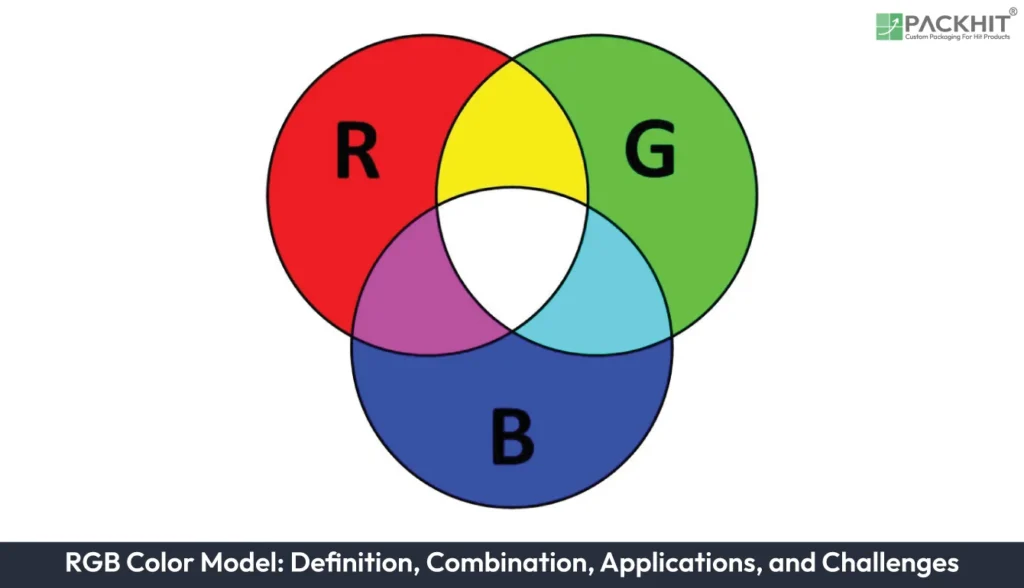
The RGB color model is an additive color system that creates colors by combining different intensities of red, green, and blue light, making it the standard color model for digital displays and screen-based design. RGB works by adjusting the intensity of each color channel to produce millions of color combinations, allowing designers to create vibrant digital artwork before converting it into a print-ready color space for packaging production. RGB is widely used for digital packaging design, product mockups, brand visualization, online marketing materials, digital printing workflows, and packaging presentations viewed on electronic devices. Although RGB provides a broad digital color gamut, challenges such as color conversion, gamut limitations, material influence, production variations, and prepress adjustments must be considered to achieve consistent color reproduction in printed packaging.
- What is the RGB Color Model?
- How Does the RGB Color Model Work?
- Applications of RGB in Packaging Design
- Packaging Design and Brand Customization
- Digital Printing Workflows
- Promotional Products and Digital Marketing
- Product Mockups and Packaging Presentations
- Challenges of Using RGB for Print
- How to Prepare RGB Artwork for Packaging Print?
- What is the Difference Between RGB Printing and the CMYK Color Model?
- What are the Future Trends in RGB Printing?
- Why Do Designers Mostly Create Packaging Artwork in RGB?
What is the RGB Color Model?
The RGB color model is an additive color system that creates colors by combining red, green, and blue light. It is primarily used for digital displays and digital artwork because screens produce images through emitted light rather than printed inks. When red, green, and blue light are combined at full intensity, the result is white, while the absence of light produces black.
Key Characteristics of the RGB Color Model
The main characteristics of the RGB color model include:
- Additive Color Model: RGB creates colors by adjusting the intensity of red, green, and blue light channels.
- Wide Color Range for Digital Design: RGB can display bright and highly saturated colors that are suitable for many screen-based applications.
- Digital Media Standard: RGB is widely used in monitors, smartphones, cameras, scanners, and design applications.
- Design Flexibility: Designers often use RGB during the creative stage because digital previews may support a broader range of colors before artwork is prepared for print.
- Print Preparation Role: For packaging production, RGB artwork is typically converted into a print-ready color space, such as CMYK or another supported print profile, before manufacturing.
How Does the RGB Color Model Work?
The RGB color model works by combining different intensities of red, green, and blue light. Each channel in a typical 8-bit-per-channel RGB system uses values from 0 to 255, where 0 represents no intensity, and 255 represents maximum intensity. This structure allows up to 256 × 256 × 256 possible color combinations, which is approximately 16.7 million theoretical color values.
For example:
- RGB (255, 0, 0) produces red.
- RGB (0, 255, 0) produces green.
- RGB (0, 0, 255) produces blue.
- RGB (255, 255, 255) produces white because all light channels are at maximum intensity.
- RGB (0, 0, 0) produces black because no light is added.
RGB is widely used for digital screens, including monitors, televisions, smartphones, and digital cameras. Because these devices display images using light-emitting pixels, RGB can support a broad range of visual colors for digital viewing. The final appearance can still vary depending on the display calibration, viewing conditions, and color settings being used.
Applications of RGB in Packaging Design
Although physical packaging is produced using ink-based printing systems such as CMYK or expanded-gamut printing, RGB remains important during packaging design, branding, and digital presentation stages. Manufacturers and designers often begin with RGB artwork because packaging concepts are frequently created, reviewed, and approved on digital screens before production begins.
Packaging Design and Brand Customization
RGB can support packaging customization workflows because many brand assets are first created for digital environments. Logos, product visuals, marketing graphics, and packaging mockups are commonly reviewed on screens before being transferred to physical packaging.
To support brand consistency, manufacturers should consider:
- Defining brand colors clearly during the design stage.
- Converting RGB artwork using an appropriate print profile before production.
- Reviewing color proofs or soft proofs when color accuracy is important.
- Accounting for differences between screen appearance and printed output.
For example, a bright digital brand color may appear less saturated after conversion to a CMYK printing process. Reviewing converted artwork before production can help identify possible adjustments needed for packaging labels, cartons, or other printed materials.
Digital Printing Workflows
Modern digital printing systems often use color management tools to translate RGB artwork into printable color spaces. ICC color profiles, calibration procedures, and proofing methods can help improve alignment between the original digital design and printed packaging.
These tools can help reduce unexpected color differences and improve production consistency, although results may vary depending on the printer, substrate, inks, calibration settings, and selected color profile.
Promotional Products and Digital Marketing
RGB is widely used for digital promotional materials connected to packaging, including:
- Social media graphics
- Online advertisements
- Website images
- E-commerce product visuals
- Digital catalogs
Using RGB for these digital applications can help maintain a consistent appearance across online brand touchpoints, while separate print preparation steps are used for physical packaging.
Product Mockups and Packaging Presentations
RGB is commonly used for 3D packaging mockups, product renderings, and digital presentations because these visuals are viewed on screens. Bright colors, gradients, and lighting effects can be represented effectively during the concept approval stage.
These digital previews can help manufacturers and brands evaluate packaging ideas before moving into physical production, although screen previews may not exactly represent final printed results.
Challenges of Using RGB for Print
RGB provides a broad range of digital colors, but several factors should be considered when preparing packaging for print:
- Color Differences: Some RGB colors may not be reproducible exactly using standard CMYK printing.
- Gamut Limitations: Bright or highly saturated RGB colors may require adjustment when converted to a printable color space.
- Material Effects: Paper, cardboard, films, coatings, and other packaging materials can influence final color appearance.
- Production Variation: Different printing systems and calibration settings may produce different results from similar artwork.
- Prepress Adjustments: Designers may need to refine colors after conversion to achieve a closer match to the intended packaging appearance.
For manufacturers producing branded packaging, RGB should be viewed as part of the design and approval workflow rather than the final printing format. Combining accurate digital design, appropriate color conversion, proofing, and communication between designers and printers can help packaging teams better evaluate expected color changes and make informed production decisions. When color accuracy is critical, additional proofing or color review may be needed to confirm that the final printed result aligns with the approved design intent.
How to Prepare RGB Artwork for Packaging Print?
Preparing RGB artwork for packaging production requires more than simply converting a file from RGB to another color space. A controlled workflow helps manufacturers and designers evaluate how digital colors may change when reproduced with inks on physical packaging materials.
Before preparing artwork for print, packaging teams should review:
- Design Intent: Identify whether the priority is matching a digital brand appearance, achieving a specific printed color target, or balancing both goals.
- Target Print Process: Consider how the selected printing method, packaging substrate, ink system, and finishing options may influence final color appearance.
- Color Profile Selection: Use a print color profile that matches the planned packaging production method. Different profiles can affect how RGB screen colors are translated into printable ink values.
- Brand-Critical Colors: Give additional attention to logos, signature brand colors, and other elements where color consistency is important.
After RGB artwork is converted for packaging print, teams can use color-managed review methods to evaluate expected changes before production. These may include:
- Reviewing a soft proof that simulates the expected printed appearance.
- Comparing converted colors against approved brand references.
- Confirming that gradients, contrast, and important design details remain suitable for the selected packaging material.
Proofing cannot completely remove differences between screen and print because displays create colors using light while packaging uses inks. However, it can help identify potential color issues before manufacturing begins.
If converted artwork does not match the expected brand appearance, additional review may be required. This may involve adjusting artwork values, reassessing the selected print profile, or creating another proof before final approval. For packaging where brand recognition depends on specific colors, early collaboration between designers, manufacturers, and print providers can help reduce unexpected production results.
What is the Difference Between RGB Printing and the CMYK Color Model?
RGB and CMYK serve different roles in packaging design and production. RGB is used primarily for digital artwork and screen-based packaging visualization, where colors are created through emitted light. CMYK is used for physical packaging production, where colors are reproduced through combinations of inks applied to materials such as cardboard, paper, films, and labels.
| Aspect | RGB | CMYK |
|---|---|---|
| Color Model | Additive light-based model used for digital packaging artwork, mockups, and screen previews | Subtractive ink-based model used for printed packaging production |
| Primary Colors | Red, Green, and Blue light channels used to create colors on digital displays | Cyan, Magenta, Yellow, and Black (Key) inks used to reproduce colors on printed packaging |
| Best Used For | Digital displays, websites, apps, digital artwork, and packaging concepts reviewed on screens | Printed packaging, labels, cartons, brochures, and other ink-based applications |
| Color Range | Typically provides a wider range of bright digital colors for screen viewing, although not all colors can be reproduced in packaging print | Limited to colors that can be produced by the selected ink system, substrate, and printing process |
| Color Creation | Colors are created by combining different intensities of red, green, and blue light | Colors are created by layering inks that absorb and reflect light on physical packaging materials |
| Printing Role | Requires preparation, conversion, and color management before packaging production | Commonly used for ink-based packaging workflows and final printed output |
For packaging projects, RGB is often used during the creative and digital approval stages, while the final production workflow depends on the selected printing process, material, and color management approach. Proper conversion, proofing, and profile selection can help teams better evaluate how digital artwork may translate into printed packaging.
What are the Future Trends in RGB Printing?
Advancements in digital printing, expanded-gamut systems such as CMYKOGV, improved ICC profiles, and more advanced color management tools are helping printers reproduce a broader range of colors from digital artwork.
These developments do not eliminate the differences between RGB displays and ink-based packaging production. However, they can improve the ability to translate digital designs into printed packaging with greater consistency. Manufacturers still need to consider limitations related to printing technology, materials, substrates, and production conditions when planning color-critical packaging projects.
Why Do Designers Mostly Create Packaging Artwork in RGB?
Designers often start in RGB because it offers a wider color gamut and more vibrant colors, making it ideal for creating, reviewing, and presenting packaging concepts on digital screens. Before production, the artwork is converted to CMYK (or another print color profile) with proper color management to achieve the closest possible match in print. This workflow helps maximize design creativity while ensuring accurate, high-quality printed packaging.